Implementing OAuth in Hotwire Native apps with Bridge Components
Introduction
OAuth is a common technique for registering and authenticating users on web and mobile apps. Many interactions in a Hotwire-based Rails app work without requiring native code but that’s not the case for OAuth.
Hotwire Native uses embedded web views to navigate the application. This works well for most web pages but is considered insecure by Google and other OAuth providers.1
…[Google] introduced a new secure browser policy prohibiting Google OAuth requests in embedded browser libraries commonly referred to as embedded webviews. All embedded webviews will be blocked…1
If we try to use a web view, Google tells us they’ve blocked this user agent.
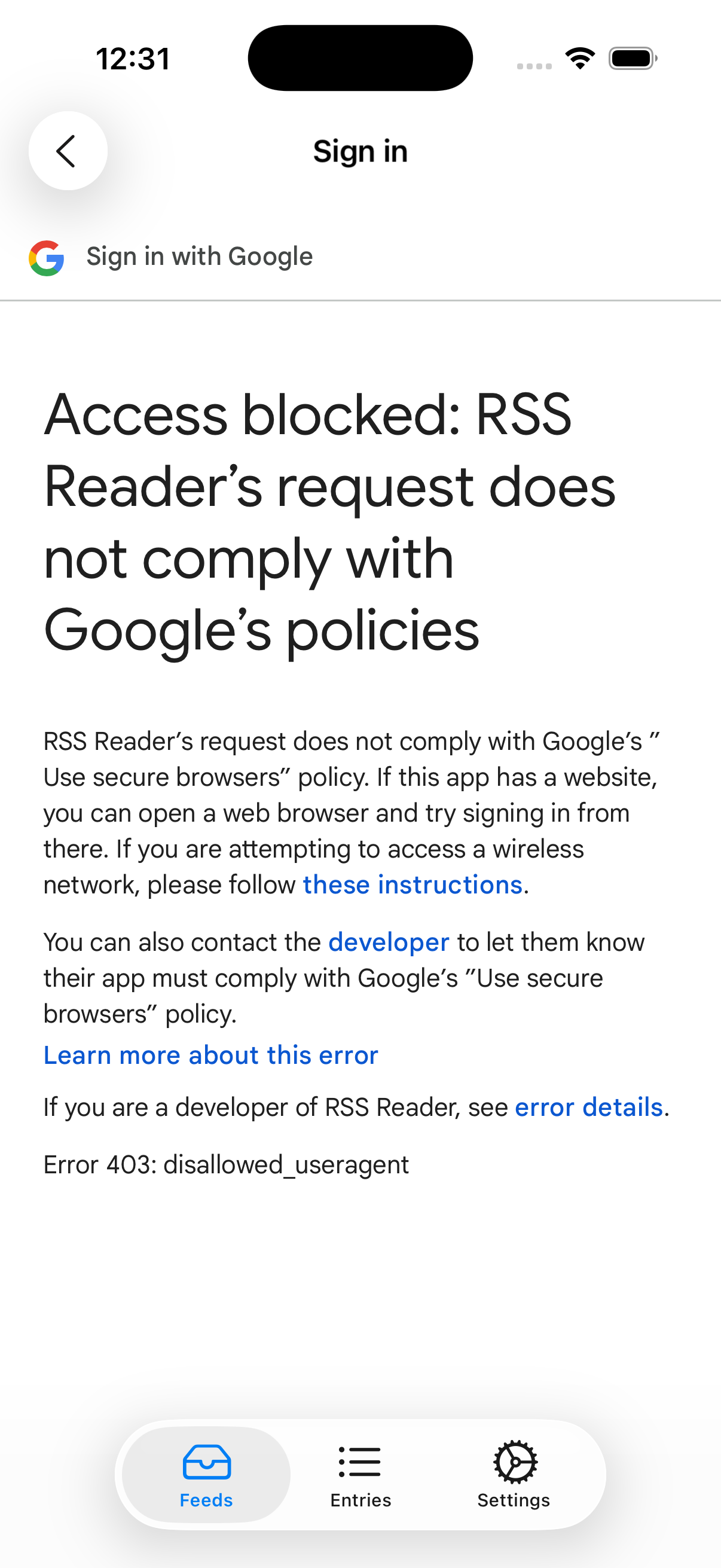
Instead of using a web view, its recommended to use a system browser.2
This post describes how to implement OAuth in a Hotwire Native application using a minimum of native code. We will first show how to implement OAuth in a Rails app and then show how to extend it to support Hotwire Native.
Web Implementation
Web-based OAuth Sign In
Before we implement OAuth on our iOS and Android apps, we need to implement it in our web app.
It’s common to use libraries like Devise and Omniauth for authentication and OAuth but here we’re going to use the Rails authentication generator and use the OAuth libraries directly instead of Omniauth. The primary reason for this is that the Apple Omniauth library does not seem to be actively maintained and monkey-patching is required to get it to work.3 It’s also easier to troubleshoot issues that arise if we are implementing the code ourselves.
The following sequence diagram describes the web OAuth process we’ll implement.
sequenceDiagram
    actor User
    participant Browser
    participant Rails
    participant Apple

    User->>Browser: click "Sign in with ..."
    Browser->>Rails: POST /apple_oauth_sessions
    Rails-->>Browser: 302 https://appleid.apple.com/auth/authorize...
    Browser->>Apple: GET https://appleid.apple.com/auth/authorize...
    Apple-->>Browser: 200 OK
    User->>Browser: fill in credentials
    Browser->>Apple: POST https://appleid.apple.com/appleauth/auth/oauth/authorize
    Apple-->>Browser: 200 OK
    Browser->>Rails: POST /apple_oauth_sessions/callback
    Note over Browser,Rails: Authenticate user
    Rails-->>Browser: 302 /entries
    Browser->>Rails: GET /entries
    Rails-->>Browser: 200 OK
The only Gem we will need is JWT to parse the JSON web token we receive from the OAuth provider.
Add the following to your Gemfile and run bundle install.
gem "jwt", "~> 3.1.2"We will need to create a new controller with two actions. The first action will redirect the user to the OAuth provider. The second action will be called by the OAuth provider and it will register and/or sign in the user.
resource :apple_oauth_sessions, only: %i[ create ] do
  collection do
    post :callback
  end
endThe create action builds the OAuth provider’s authorization URL using:
- a client ID you get from the provider
- a callback URL that is called after the user authentications with the provider
- a state and nonce you generate and store for verification later.
The state and nonce cookies for Apple’s OAuth implementation must be SameSite: None; Secure since Apple implicitly triggers a new session by using a POST callback instead of a GET callback.
The result of the action is an external redirect to the authorization URL.
class AppleOauthSessionsController < ApplicationController
  allow_unauthenticated_access

  def create
    nonce = SecureRandom.urlsafe_base64(16)
    state = SecureRandom.hex(24) + ":" + params[:platform]
    redirect_uri = callback_apple_oauth_sessions_url

    cookies.encrypted[:apple_oauth_state] = {
      same_site: :none,
      expires: 1.hour.from_now,
      secure: true,
      value: state
    }
    cookies.encrypted[:apple_oauth_nonce] = {
      same_site: :none,
      expires: 1.hour.from_now,
      secure: true,
      value: nonce
    }

    oauth_client = AppleOauthClient.new
    authorization_url = oauth_client.authorization_url(
      state: state,
      nonce: nonce,
      redirect_uri: redirect_uri
    )

    redirect_to authorization_url, allow_other_host: true
  end
endclass AppleOauthClient
AUTHORIZE_URL = "https://appleid.apple.com/auth/authorize"
def authorization_url(state:, nonce:, redirect_uri:)
query_string = {
client_id:,
nonce:,
redirect_uri:,
response_mode: "form_post",
response_type: "code",
scope: "email name",
state:
}.to_query
"#{AUTHORIZE_URL}?#{query_string}"
end
private
def client_id
Rails.application.credentials.dig(:apple, :service_identifier)
end
endThe callback action is called by the OAuth provider after the user is authenticated by the provider. It starts by verifying the authenticity of the request. If the request is authentic, the user is created and signed in. If the request is not authentic, the user is redirected to the login page.
class AppleOauthSessionsController < ApplicationController
  skip_before_action :verify_authenticity_token, only: [ :callback ]
  allow_unauthenticated_access
  before_action :verify_oauth_state, only: [ :callback ]
  before_action :verify_oauth_nonce, only: [ :callback ]

  def callback
    user_info = authenticate_with_apple
    user = create_user(user_info)
    unless user.persisted?
      redirect_to new_session_path, alert: "Unable to sign in. Please try again."
      return
    end

    sign_in_and_redirect_user(user)
  rescue => e
    redirect_to new_session_path, alert: "Unable to sign in. Please try again."
  end

  private

  def authenticate_with_apple
    oauth_client = AppleOauthClient.new
    oauth_client.authenticate(
      code: params[:code],
      redirect_uri: callback_apple_oauth_sessions_url,
      nonce: stored_nonce
    )
  end

  def create_user(user_info)
    OauthUserService.find_or_create(
      oauth_provider: :apple,
      current_user: authenticated? ? current_user : nil,
      uid: user_info[:uid],
      email: user_info[:email]
    )
  end

  def verify_oauth_state
    stored_state = cookies.encrypted[:apple_oauth_state]
    cookies.delete(:apple_oauth_state)
    unless params[:state].present? && ActiveSupport::SecurityUtils.secure_compare(params[:state], stored_state)
      redirect_to new_session_path, alert: "Invalid request. Please try again."
    end
  end

  def verify_oauth_nonce
    unless stored_nonce.present?
      redirect_to new_session_path, alert: "Invalid request. Please try again."
    end
  end

  def sign_in_and_redirect_user(user)
    start_new_session_for user
    redirect_to after_authentication_url
  end

  def stored_nonce
    return @stored_nonce if defined?(@stored_nonce)
    @stored_nonce = cookies.encrypted[:apple_oauth_nonce]
    cookies.delete(:apple_oauth_nonce)
    @stored_nonce
  end
endAppleOauthClient#authenticate is called by the controller action above to exchange the code received from the provider for a JWT which contains the authenticated user’s information like their email address.
class AppleOauthClient
  TOKEN_URL = "https://appleid.apple.com/auth/token"
  KEYS_URL = "https://appleid.apple.com/auth/keys"

  def authenticate(code:, redirect_uri:, nonce:)
    tokens = exchange_code_for_tokens(code, redirect_uri)

    unless tokens && tokens["id_token"]
      raise AuthenticationError, "Failed to exchange code for tokens"
    end

    user_info = decode_id_token(tokens["id_token"])

    # Verify nonce matches to prevent replay attacks
    unless user_info["nonce"] == nonce
      raise AuthenticationError, "Nonce verification failed"
    end

    {
      uid: user_info["sub"],
      email: user_info["email"]
    }
  end

  class AuthenticationError < StandardError; end

  private

  def client_id
    Rails.application.credentials.dig(:apple, :service_identifier)
  end

  def generate_client_secret
    # Apple requires a JWT signed with your private key
    private_key = OpenSSL::PKey::EC.new(Rails.application.credentials.dig(:apple, :private_key))

    headers = {
      kid: Rails.application.credentials.dig(:apple, :key_id)
    }

    claims = {
      iss: Rails.application.credentials.dig(:apple, :team_id),
      iat: Time.now.to_i,
      exp: Time.now.to_i + 86400 * 180, # 180 days
      aud: "https://appleid.apple.com",
      sub: client_id
    }

    JWT.encode(claims, private_key, "ES256", headers)
  end

  def exchange_code_for_tokens(code, redirect_uri)
    client_secret = generate_client_secret

    response = Net::HTTP.post_form(
      URI(TOKEN_URL),
      client_id:,
      client_secret:,
      code:,
      grant_type: "authorization_code",
      redirect_uri:
    )

    JSON.parse(response.body) if response.is_a?(Net::HTTPSuccess)
  end

  def decode_id_token(id_token)
    jwks = JSON.parse(Net::HTTP.get(URI(KEYS_URL)), symbolize_names: true)
    jwks_keys = jwks[:keys]
    JWT.decode(id_token, nil, true, { jwks: { keys: jwks_keys }, algorithm: "RS256" }).first
  end
endWe need to to add a form and a Sign in with Apple button to the sign in page.
<%= form_with(
  url: apple_oauth_sessions_path,
  method: :post,
  data: {
    turbo: false
  }) do |form| %>
  <%= form.submit "Sign in with Apple", class: "btn-outline w-full" %>
<% end %>Setting data-turbo="false" is important.
If we don’t do this, Turbo will perform the form submission over JavaScript and OAuth providers will block the request as a security measure.
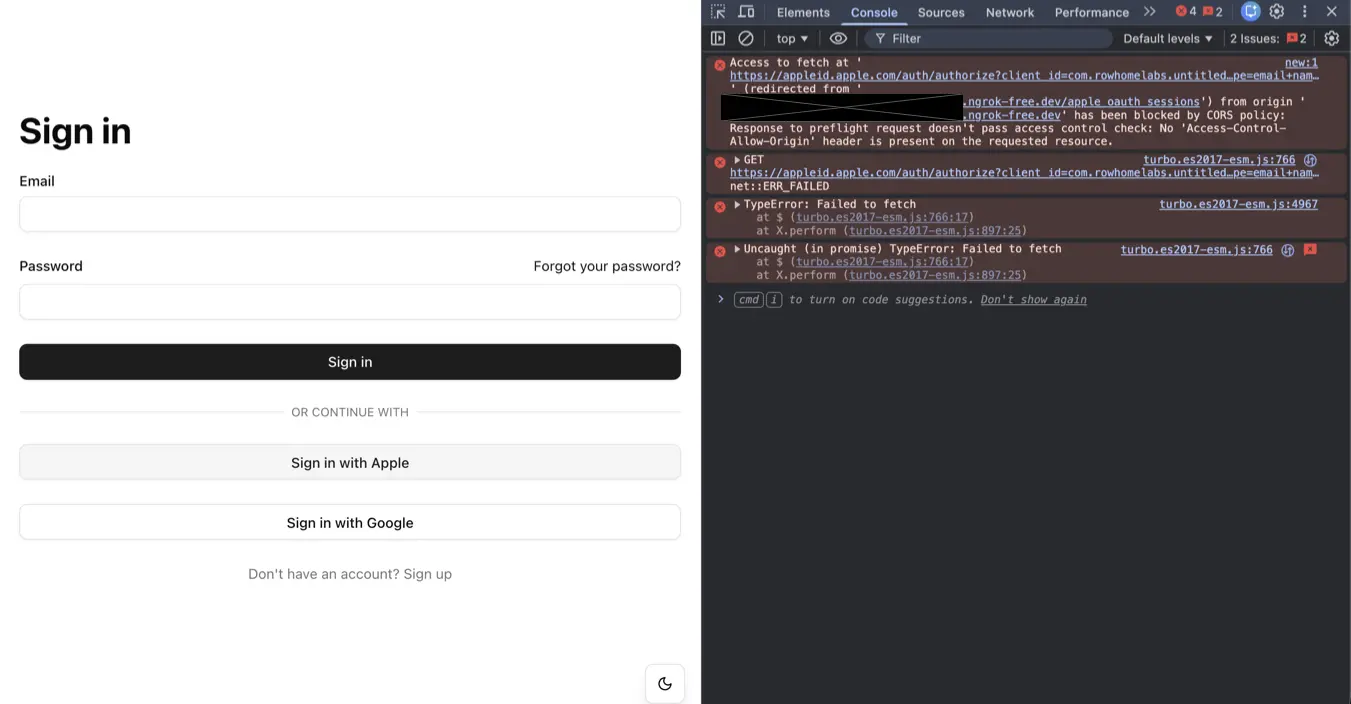 CORS Policy Error when using Turbo
Sign in with Apple is now working on the web.
Hotwire Native implementation
Native OAuth Sign In
By default, Hotwire Native apps use a web view. This is a problem for OAuth since web views are disallowed for security reasons. Instead, we need to use a system browser.
We will create a brige component that is reponsbile for starting the OAuth process in a system browser. The bridge component will be given two values: a start path and a token authentication path. The bridge component will intercept the “Sign in with …” form submission. Instead of directly redirecting the user to the OAuth provider, the bridge component will send a message to the native bridge component. The native bridge component will start a system browser and within it navigate to the start path provided by the bridge component. The start page will have a form on it that automatically submits when the page loads. This form will redirect the user to the OAuth provider within the system browser.
After the user fills in their credentials on the OAuth provider’s site, the OAuth provider will call the callback endpoint. We cannot sign in the user during this callback since the callback runs inside the system browser and we want the user to be authenticated within the web view. Instead, the callback will redirect the user to the native app using a custom scheme URL along with a signed token representing the user. When the app is opened by the custom scheme URL, we’ll have the app close the system browser and call the token authentication endpoint provided to the bridge component from within the web view. The user will now be authenticated within the web view and can use the app as an authenticated user.
The following sequence diagram describes this process.
sequenceDiagram
    actor User
    participant WKWebView
    participant SFSafariViewController
    participant Rails
    participant Apple

    User->>WKWebView: click "Sign in with ..."
    WKWebView->>SFSafariViewController: launch
    SFSafariViewController->>Rails: GET /apple_oauth_sessions/new
    Rails-->>SFSafariViewController: 200 OK
    SFSafariViewController->>Rails: POST /apple_oauth_sessions
    Rails-->>SFSafariViewController: 302 https://appleid.apple.com/auth/authorize...
    SFSafariViewController->>Apple: GET https://appleid.apple.com/auth/authorize...
    Apple-->>SFSafariViewController: 200 OK
    User->>SFSafariViewController: provide Apple credentials
    SFSafariViewController->>Apple: POST https://appleid.apple.com/appleauth/auth/oauth/authorize
    Apple-->>SFSafariViewController: 200 OK
    SFSafariViewController->>Rails: POST /apple_oauth_sessions/callback
    Note over SFSafariViewController,Rails: Generate signed token
    Rails-->>SFSafariViewController: 302 rssreader://auth-callback
    SFSafariViewController->>WKWebView: GET rssreader://auth-callback
    WKWebView->>Rails: GET /apple_oauth_sessions/authenticate_by_token
    Note over WKWebView,Rails: Authenticate by signed token
    Rails-->>WKWebView: 302 /entries
    WKWebView->>Rails: GET /entries
    Rails-->>WKWebView: 200 OK
We’ll start by creating the Sign in with OAuth bridge component.
import { BridgeComponent } from "@hotwired/hotwire-native-bridge"

export default class extends BridgeComponent {
  static component = "sign-in-with-oauth"
  static values = {
    startPath: String
  }

  interceptSubmit(event) {
    event.preventDefault()

    const startPath = this.startPathValue
    this.send("click", { startPath })
  }
}Then we’ll update the Sign in with OAuth form that we created earlier to intercept the form submission. Since this controller is a bridge component, it will only take affect on native apps and the form submission will be a normal form submission on the web.
<%= form_with(
  url: apple_oauth_sessions_path,
  method: :post,
  data: {
    controller: "bridge--sign-in-with-oauth",
    action: "submit->bridge--sign-in-with-oauth#interceptSubmit",
    bridge__sign_in_with_oauth_start_path_value: new_apple_oauth_sessions_path
  }) do |form| %>
  <%= form.submit "Sign in with Apple", class: "btn-outline w-full" %>
<% end %>The bridge component needs to know the path for the start page so we’ll create that next.
resource :apple_oauth_sessions, only: %i[ new ... ]class AppleOauthSessionsController < ApplicationController
def new
render :new, layout: false
end
end<%= form_with(
url: apple_oauth_sessions_path,
method: :post,
data: {
controller: "form-submit",
turbo: false
}) do |form| %>
<%= form.hidden_field :platform, value: params[:platform] %>
<% end %>We’ll add a Stimulus controller to the form to submit it automatically when the page loads.
import { Controller } from "@hotwired/stimulus"

export default class extends Controller {
  connect() {
    this.element.requestSubmit()
  }
}This native bridge component will receive the “click” event sent by the Stimulus controller, launch the system browser and navigate to the start path within it.
class SignInWithOauthComponent: BridgeComponent {
    ...

    private var safariViewController: SFSafariViewController?

    override func onReceive(message: Message) {
        guard let event = Event(rawValue: message.event) else { return }

        switch event {
        case .click:
            onClick(message: message)
        }
    }

    private func onClick(message: Message) {
        guard let data: MessageData = message.data(),
              let startUrl = URL(string: "\(baseUrl)\(data.startPath)") else { return }

        launchSafariViewController(with: startUrl)
    }

    private func launchSafariViewController(with url: URL) {
        let safariVC = SFSafariViewController(url: url)
        safariVC.modalPresentationStyle = .pageSheet
        self.safariViewController = safariVC

        viewController.present(safariVC, animated: true)
    }
}

private extension SignInWithOauthComponent {
    enum Event: String {
        case click
    }

    struct MessageData: Decodable {
        let startPath: String
    }
}@main
class AppDelegate: UIResponder, UIApplicationDelegate {
func application(
...
) -> Bool {
...
Hotwire.registerBridgeComponents([
SignInWithOauthComponent.self,
])
...
}
}If we test the OAuth process in our native app, we should see the system browser launch and navigate to the OAuth provider’s authorization page. We can fill in our credentials and we’ll be redirected back to site but we’ll only be authenticated within the system browser. We need to be authenticated within the web view.
We need to update the callback action to redirect to the app’s custom scheme URL if the callback is coming from the native app. A signed token representing the user is included in the redirect URL so the native app can authenticate the user.
class AppleOauthSessionsController < ApplicationController
  ...

  def callback
    user_info = authenticate_with_apple
    user = create_user(user_info)
    unless user.persisted?
      redirect_to new_session_path, alert: "Unable to sign in. Please try again."
      return
    end

    platform = params[:state].split(":").last
    if platform == "native"
      token = user.signed_id(purpose: :native_auth, expires_in: 5.minutes)
      redirect_to "rssreader://auth-callback?token=#{token}&platform=#{platform}", allow_other_host: true
    else
      sign_in_and_redirect_user(user)
    end
  rescue => e
    redirect_to new_session_path, alert: "Unable to sign in. Please try again."
  end
endThe native app needs to know what the token authentication path is so we include that in the bridge component.
<%= form_with(
  url: apple_oauth_sessions_path,
  method: :post,
  data: {
    controller: "bridge--sign-in-with-oauth",
    action: "submit->bridge--sign-in-with-oauth#interceptSubmit",
    bridge__sign_in_with_oauth_start_path_value: new_apple_oauth_sessions_path(platform: "native"),
    bridge__sign_in_with_oauth_token_auth_path_value: authenticate_by_token_apple_oauth_sessions_path
  }) do |form| %>
  <%= form.submit "Sign in with Apple", class: "btn-outline w-full" %>
<% end %>import { BridgeComponent } from "@hotwired/hotwire-native-bridge"
export default class extends BridgeComponent {
static component = "sign-in-with-oauth"
static values = {
startPath: String,
tokenAuthPath: String,
}
interceptSubmit(event) {
event.preventDefault()
const startPath = this.startPathValue
const tokenAuthPath = this.tokenAuthPathValue
this.send("click", { startPath, tokenAuthPath })
}
}class SignInWithOauthComponent: BridgeComponent {
...
private var tokenAuthPath: String?
override func onReceive(message: Message) {
guard let event = Event(rawValue: message.event) else { return }
switch event {
case .click:
onClick(message: message)
}
}
private func onClick(message: Message) {
...
self.tokenAuthPath = data.tokenAuthPath
launchSafariViewController(with: startUrl)
}
...
}
private extension SignInWithOauthComponent {
enum Event: String {
case click
}
struct MessageData: Decodable {
let startPath: String
let tokenAuthPath: String
}
}The token authentication action will take the token, lookup the corresponding user and sign in the user.
resource :apple_oauth_sessions, only: %i[ ... ] do
  collection do
    get :authenticate_by_token
  end
endclass AppleOauthSessionsController < ApplicationController
...
def authenticate_by_token
user = User.find_signed(params[:token], purpose: :native_auth)
if user
sign_in_and_redirect_user(user)
else
redirect_to welcome_path, alert: "Unable to sign in. Please try again."
end
end
endWe need the native component to close the system browser and navigate to the token authentication path when the callback is received. We’ll achieve this by adding an observer when the system browser is launched. When the callback endpoint redirects back to the app via the custom scheme URL, we’ll trigger the observer’s callback function which will close the system browser and navigate to the token authentication path in the web view.
class SignInWithOauthComponent: BridgeComponent {
    ...

    private func launchSafariViewController(with url: URL) {
        ...

        NotificationCenter.default.addObserver(
            self,
            selector: #selector(handleAuthCompletion),
            name: .signInWithOauthCompleted,
            object: nil
        )
   }

    @objc private func handleAuthCompletion(_ notification: Notification) {
        NotificationCenter.default.removeObserver(self, name: .signInWithOauthCompleted, object: nil)

        let token = notification.userInfo?["token"] as? String

        safariViewController?.dismiss(animated: true) { [weak self] in
            self?.safariViewController = nil
            self?.authenticateWithToken(token)
        }
    }

    private func authenticateWithToken(_ token: String?) {
        guard let webViewController = delegate?.destination as? HotwireWebViewController,
              let webView = webViewController.visitableView.webView else { return }

        if let token = token, let tokenAuthPath = tokenAuthPath {
            guard let tokenLoginUrl = URL(string: "\(baseUrl)\(tokenAuthPath)") else { return }

            var components = URLComponents(url: tokenLoginUrl, resolvingAgainstBaseURL: false)
            components?.queryItems = [URLQueryItem(name: "token", value: token)]

            if let url = components?.url {
                webView.load(URLRequest(url: url))
            }
        } else {
            webView.reload()
        }
    }
}

...

extension Notification.Name {
    static let signInWithOauthCompleted = Notification.Name("signInWithOauthCompleted")
}extension SceneController: UIWindowSceneDelegate {
func scene(
...
) {
...
if let urlContext = connectionOptions.urlContexts.first {
handleIncomingURL(urlContext.url)
}
}
func scene(_ scene: UIScene, openURLContexts URLContexts: Set<UIOpenURLContext>) {
guard let url = URLContexts.first?.url else { return }
handleIncomingURL(url)
}
private func handleIncomingURL(_ url: URL) {
guard let host = url.host else { return }
switch host {
case "auth-callback":
let components = URLComponents(url: url, resolvingAgainstBaseURL: false)
let token = components?.queryItems?.first(where: { $0.name == "token" })?.value
NotificationCenter.default.post(
name: .signInWithOauthCompleted,
object: nil,
userInfo: token != nil ? ["token": token!] : nil
)
default:
...
}
}
}The OAuth sign in process is now working in the Hotwire Native app. The code can be found on Github here.
What’s Next
This post only covers OAuth for Apple. A follow up post will describe how to implement the same approach described here in an Hotwire Native Android app with Google Sign In.
Reach out to me on my socials if you have any questions or feedback. I’m especially curious about alternative approaches implementing OAuth in Hotwire Native apps.